X333 Game Real Money Earning App Download Free Now
Now
7.66 MB
v1.1.81
Android 7+
333k+
Description
📑 Table of Contents
- X333 Game Android Application
- What Is X333 Game?
- X333 Game APK Overview
- Main Features of X333 Game
- How to Download X333 Game APK
- How to Install X333 Game on Android
- How to Get Started With X333 Game
- How to Register and Login
- Deposit and Withdrawal Guide
- Customer Support
- X333 Game Bonuses and Rewards
- Interface and Navigation
- Android Compatibility
- Important Safety Tips
- Common Problems and Solutions
- Pros and Cons
- Tips for a Better User Experience
- Is X333 Game Worth Exploring?
- Frequently Asked Questions
- Conclusion
X333 Game is a mobile gaming app for Android users who want to discover different gaming options through a simple interface. This guide explains its basic details, installation steps, device compatibility, and available features. It also helps beginners understand the app before deciding whether to install it on their devices.

This X333 Game APK guide explains the important points in simple English. It covers the application overview, download information, installation steps, account access, general usage, common problems, and safety considerations. Whether you are learning about the app for the first time or looking for an Android installation guide, this article provides helpful information in one place.
What Is X333 Game?
X333 Game is a mobile gaming app designed for Android users who want to explore different gaming options in one place. The X333 Game APK provides a convenient way to access its app interface, explore available sections, and learn about its basic functions. Users can review the app details and device requirements before installation to make an informed choice.
The X333 mobile app should be explored carefully. Read the available instructions, check the application source, and understand its terms before using any account-related options. App details can change with different releases, so it is better to confirm the latest information rather than depend on old descriptions.
Android Application Overview
Before installing an Android application, checking its basic details is a useful step. The following table provides a general overview of X333 Game.
| App Information | Details |
|---|---|
| App Name | X333 Game |
| APK Name | X333 Game APK |
| App Category | Mobile Gaming |
| Platform | Android |
| File Format | Android APK |
| Device Support | Compatible Android devices |
| Language | Check inside the application |
| Latest Version | Verify available release |
| File Size | Check download file |
| Developer | Verify from official source |
| Download Method | Available APK source |
Some information may depend on the version or distribution source. Always check the actual APK details before installation.
Main Features
A mobile application should be easy to understand and convenient to explore. When reviewing X333 Game, users can pay attention to the following general areas.
Simple Application Design
A clear application design helps users understand where different options are located. Menus, labels, and page sections should be easy to recognise.
Easy Navigation
Navigation is an important part of any Android application. Clearly arranged menus can help users move between available sections without unnecessary confusion.
Android Mobile Access
The platform is associated with Android app searches. Users should check their device compatibility and the required Android version before attempting installation.
Application Information
Reading the available app information helps users understand its purpose, requirements, and usage instructions. Always prefer details provided by a reliable source.
Account Options
If the application provides account-related sections, review their instructions carefully. Do not share personal information unless you understand why it is required and how it will be handled.
How to Download X333 Game APK

Downloading an APK file requires attention because Android applications may come from different sources. Follow these general steps to check the download process.
- Open a trusted source that provides reliable information about the application apklogic.com.pk
- Find the X333 Game download section.
- Check the available APK version and file information.
- Review the Android compatibility details.
- Read the provided instructions before selecting the download option.
- Wait for the file to finish downloading.
- Check the downloaded file before moving to installation.
Make sure the file name and version match the information provided by the source. Avoid downloading files from unfamiliar pages or advertisements.
How to Install X333 App on Android
After downloading an APK file, you can follow the general Android installation process. The exact steps may differ slightly depending on your phone model and Android version.
Locate the APK File
Open your phone’s File Manager and find the Downloads folder. Look for the X333 Game APK file that you downloaded.
Check the File
Before opening the file, check its name and size. If the download stopped before completion, download the file again from a trusted source.
Allow Installation
Some Android devices ask for permission before installing applications from outside the Play Store. Open the relevant Android settings and review the permission request carefully.
Start Installation
Select the APK file and follow the instructions displayed on your screen. Wait until the installation process finishes.
Open the Application
After installation, check your phone’s app list. If the application appears there, you can open it and review the available information.
How to Get Started With Platform
New users should take a little time to understand an application before exploring its different sections. A careful start can make the overall experience easier.
First, open the application and review its welcome screen. Read the displayed information and look at the available menus. Do not skip important instructions, especially those related to account access and privacy.
If registration or login options are available, follow the instructions shown inside the application. Use accurate information only when necessary and check the privacy terms before submitting personal details.
After opening the main interface, explore the available sections one by one. Understanding the menu arrangement can help you use the application more comfortably.
How to Register and Login
New users can follow these general steps to understand the registration and login process of X333 Game.
How to Register
- Open the X333 Game application on your Android device.
- Look for the Register or Sign Up option.
- Enter the information requested on the registration screen.
- Create a password if required.
- Review the entered details carefully.
- Follow the on-screen instructions to complete registration.
How to Login
- Open the X333 Game app.
- Select the Login option.
- Enter your registered account details.
- Type your password carefully.
- Check your information before continuing.
- Follow the instructions to access your account.
Note: Registration fields and login options may vary depending on the available app version. Never share your password or verification code with anyone.
Deposit and Withdrawal Guide
Users who want to understand the payment section of X333 Game should first review the available options and instructions. The deposit and withdrawal features may vary depending on the app version and account settings.
How to Make a Deposit
- Open the X333 application.
- Log in to your account.
- Find the Deposit option, if available.
- Review the displayed payment methods.
- Check the minimum amount and other conditions.
- Follow the on-screen instructions.
- Review the details before confirming any transaction.
How to Request a Withdrawal
- Open the application and log in.
- Navigate to the Withdrawal section, if available.
- Review the displayed withdrawal methods.
- Check the minimum requirements and applicable conditions.
- Enter the requested details carefully.
- Review the information before submitting a request.
- Check the transaction status through the app.
Important Things to Consider
- Check all transaction details before proceeding.
- Review the payment terms and conditions.
- Never share your password or verification codes.
- Keep transaction records for reference.
- Do not assume a transaction is successful until its status is confirmed.
Note: Actual deposit and withdrawal methods, limits, and processing times should be verified through the app’s available information.
Get Help and Support

If users experience any difficulty while using X333 Game, they can look for assistance through the app’s available support options. The Help section may provide useful guidance about account access, app navigation, and common technical problems. Before contacting support, keep the relevant details ready and use only contact information provided through a verified source.
Bonuses and Rewards
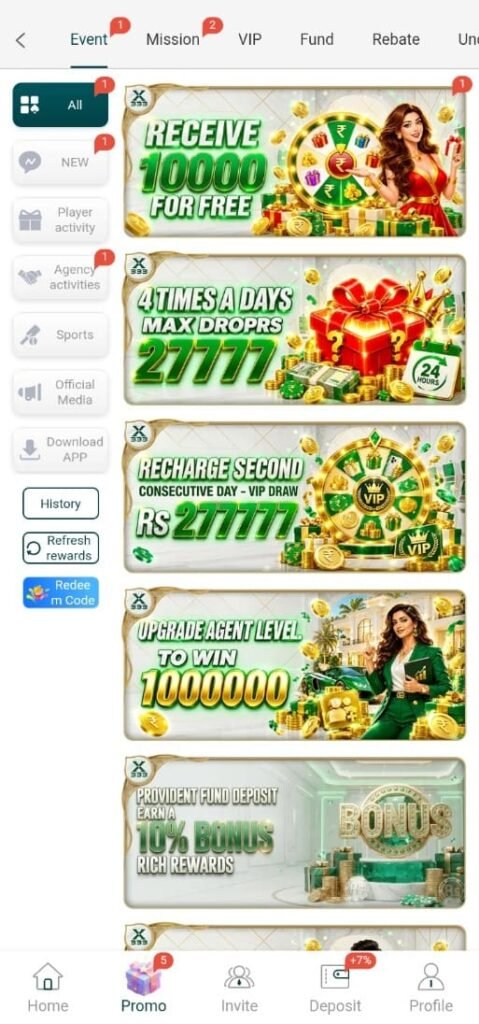
X333 Game may display different bonus or promotional options for users. Available offers and their conditions can vary depending on the app version and account eligibility. Users should check the bonus section to understand the requirements, usage rules, and applicable terms before participating.
X333 Game Interface and Navigation
The application interface plays an important role in helping users understand its available options. A well-organised interface usually makes it easier to locate menus and read important information.
When exploring X333 Game, pay attention to these areas:
- Main Screen: Review the information displayed when the application opens.
- Menu Options: Check the available sections and their labels.
- Account Section: Read the instructions related to account access.
- Settings: Look for available application and privacy controls.
- Help Information: Check whether the application provides guidance for users.
The actual menu arrangement may vary depending on the installed version. Therefore, always follow the instructions displayed on your own device.
X333 App Android Compatibility
Before installing X333 Game APK, check whether your Android phone supports the available application version. Compatibility can depend on the Android operating system, device hardware, storage space, and application requirements.
Here are some useful checks:
- Confirm that your Android version meets the listed requirements.
- Keep enough free storage available.
- Use a stable internet connection when downloading the file.
- Check whether your device supports the required application format.
- Keep your Android system updated when possible.
If the application does not support your device, avoid trying random files or modified versions. Look for reliable compatibility information instead.
Important Safety Tips Before Using the App
Checking an application before installation is an important part of responsible mobile use. These simple precautions can help protect your device and personal information.
- Check the Download Source: Choose a source that provides clear application information.
- Review Permissions: Only allow permissions that are necessary and understandable.
- Read Privacy Details: Understand how the application handles personal information.
- Avoid Unknown Files: Do not install modified or unfamiliar APK files.
- Protect Account Details: Never share passwords or private account information.
- Check Updates: Review new versions before installing them.
- Understand the Terms: Read the available rules and conditions before using the application.
Take time to review these points instead of rushing through the installation process.
Common Problems and Solutions
Sometimes Android users experience problems while downloading, installing, or opening an application. The following table explains some common situations and basic steps that may help.
| Common Problem | Possible Solution |
|---|---|
| Installation Error | Check the APK file and device compatibility. |
| App Not Opening | Restart your phone and try again. |
| Download Interruption | Check your internet connection. |
| Slow Performance | Close unused background applications. |
| Login Problem | Review the displayed account instructions. |
| Storage Warning | Free up some device storage. |
| File Not Found | Check the Downloads folder. |
If a problem continues, check the application’s available support information. Avoid installing additional files from unknown sources to fix an issue.
Pros and Cons
Every mobile application has points that users should review before installation. Here are some general considerations.
Pros
- Android APK installation format.
- Application information can be reviewed before installation.
- Users can explore the available menu options.
- Device compatibility can be checked in advance.
- Basic installation steps are easy to follow.
Cons
- Latest version details may vary by source.
- Compatibility depends on the Android device.
- Some application information may not be available.
- Users should review privacy and permission requirements.
Tips for a Better User Experience
A few simple habits can make mobile application use more convenient.
- Keep your phone software updated.
- Maintain enough free storage space.
- Use a reliable internet connection.
- Read instructions before selecting an option.
- Close applications that you are not using.
- Review new application versions carefully.
- Protect your personal information.
These basic steps are useful for maintaining a well-organised Android device.
Is X333 Game Worth Exploring?
Before exploring any new mobile gaming application, users should understand its available information and requirements. X333 Game can be reviewed by checking its application details, interface, compatibility, and installation instructions.
Do not make a decision based only on promotional descriptions. Check the source, read the terms, and understand the available options. A careful approach helps users decide whether an application meets their expectations.
Frequently Asked Questions
1. What should I check before downloading an APK?
2. Can I install an APK on every Android phone?
3. What should I do if installation fails?
4. How can I keep my account information safe?
5. Where can I find help with technical issues?
6. Why should I review app permissions before installation?
Conclusion
X333 Game is an Android gaming app for users interested in exploring mobile entertainment options. This guide covers its basic information, APK download process, installation instructions, device compatibility, and available features to help beginners understand the application before getting started.
Before downloading the X333 Game APK, take a moment to review the app details, supported Android version, and required permissions. Also, check the installation instructions and available terms to understand how the application works. These simple checks can help you make a more informed decision before installing it on your device.
What's new
X333 Game is an Android mobile gaming application that users can explore through its available options and interface. It is important to check the application details download source and device compatibility before installation. This guide helps Android users understand the basic app information download process installation steps and important safety points in simple language.