TD999 Game APK Download for Android in Pakistan 2026
6.79 MB
v.1.1.80
Android6+
2000+
Description
Finding clear information about an online APK Android gaming application can help users make better decisions before installation. TD999 Game is searched by people who want to explore its app details, account options, mobile compatibility, and general gaming experience. This complete guide explains the application in simple English for Pakistani users.
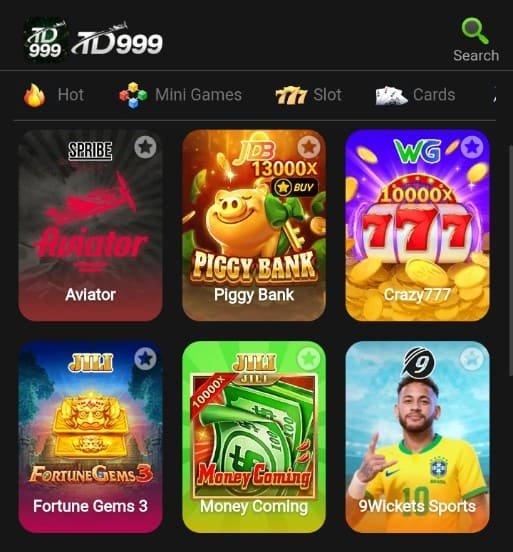
It covers the installation process, registration steps, login instructions, interface, available sections, app updates, and useful safety information. Beginners can use this guide to understand the basic process before getting started. More useful options for curious users 1777PKR Game, SQ777 Game, JJ77 Game
📑 Table of Contents
What Is TD999 Game APK?
TD999 Game is an Android application that users may explore when looking for mobile gaming options. It provides an app-based experience where users can check the available menus, account options, and other sections displayed in the installed version.
People searching for its TD999 Game APK usually want to understand how to download, install, and access the application on an Android phone. Before proceeding, users should check the available version information, device requirements, and download source.
For beginners, it is helpful to become familiar with the main screen before exploring individual sections. Reading the instructions and understanding the available options can make the initial experience easier.
How the TD999 Application Works
The TD999 Game application generally uses a main dashboard to organize its different sections. Users can open the app, review the available menus, and follow the instructions displayed on their screens.
The basic process includes:
- Check the TD999 Game information.
- Review the Android requirements.
- Download the APK from a source you trust.
- Install the file on your device.
- Open the application.
- Explore the available game menus.
- Review account settings and instructions.
The exact process and available options may differ between versions. Always follow the instructions shown in the installed application and check the relevant details before using any feature.
Main Features Explained
Understanding the basic features can help new users become familiar with a mobile application. The following sections explain common areas users may want to check.
Simple User Interface
A clear interface makes it easier to understand different menus. Users can explore the main screen and identify where account settings and other options are located.
Easy Navigation
Navigation plays an important role in the mobile experience. Well-organized menus can help users move between different sections without unnecessary confusion.
Mobile-Friendly Design
An Android application should display properly on different mobile screens. Users can check how the menus, text, and available controls appear on their own devices.
Game Categories
Gaming applications may organize their available content into separate categories. Users should check the installed version to see which categories are actually available.
Account Management
Account settings can help users review their profile information and access options. It is important to keep account details private and use a strong password.
App Settings
The settings area may provide useful preferences and application information. Users should review the available options and avoid changing settings they do not understand.
Why Users Explore This Application
Many Android users prefer to understand an application before installing it. They may want to check its interface, account options, device requirements, and available sections.
A complete guide can make this process easier by explaining the basic steps in one place. It also helps beginners understand what information to check before using an unfamiliar application.
Users should remember that app availability and individual features can change. Therefore, checking the latest information is always a sensible step.
How to Download TD999 Game APK
Before downloading the TD999 Game APK file, check the source and application details carefully.
Follow these general instructions:
- Visit a website that provides clear application information, such as apklogic.com.pk.
- Search for the correct TD999 Game application name.
- Check the available version number.
- Review the file size and Android requirements.
- Read the download instructions carefully.
- Download the APK only if you trust its source.
- Locate the saved file in your phone’s Downloads folder.
Avoid downloading files from unfamiliar pages. Check the file details, permissions, and compatibility before starting the installation process.
How to Install the APK File on Android
After downloading the file, follow these general steps:
- Open the File Manager on your Android phone.
- Select the Downloads folder.
- Find the downloaded APK file.
- Tap the file to view the installation prompt.
- Review the information displayed by your phone.
- Continue only if you trust the file.
- Wait for installation to finish.
- Open the application if installation completes successfully.
If Android displays a security warning, read it carefully. Do not ignore warnings or allow unnecessary permissions.
How to Register TD999 Game
If the application offers account registration, new users can follow the instructions below.
Open the Application
Start the installed application and wait for the main screen to load.
Find the Registration Option
Look for the Register or Sign Up option if it is available.
Enter Required Details
Provide the information requested on the registration screen. Check your entries before continuing.
Create a Password
Choose a strong password that is difficult to guess. Avoid using personal information or passwords from other accounts.
Complete Verification
If verification is requested, follow the instructions displayed on the screen. Never share private verification codes with anyone.
Review Your Account
After completing registration, check your profile and available account settings. Keep your login information in a safe place.
Login Guide for Existing Users
Users who already have an account can check the login section to access it.
Follow these general steps:
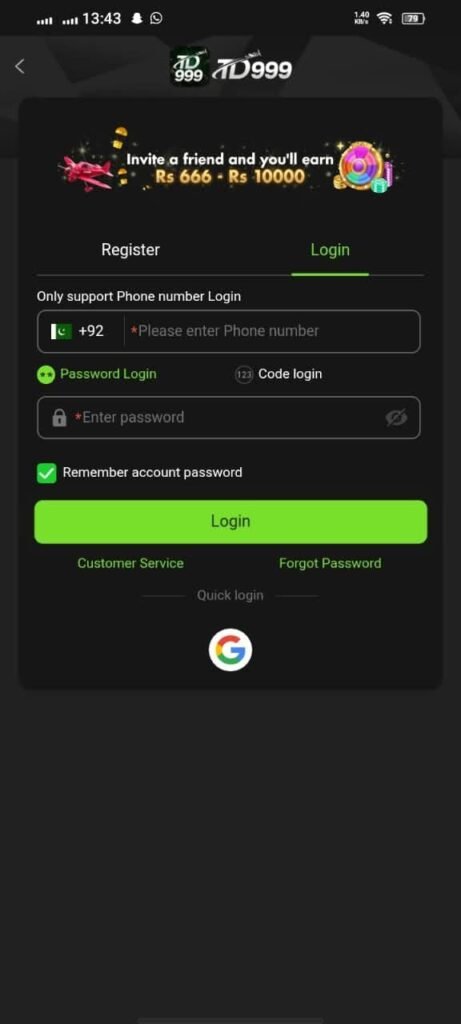
- Open the application on your phone.
- Select the Login option.
- Enter your registered username or required mobile details.
- Type your password.
- Check the information carefully.
- Continue using the displayed login option.
- Wait for the account screen to open.
If you cannot access your account, check your login details and internet connection. Use the password recovery option if it is available.
Understanding the Main Dashboard
The dashboard is usually the first screen users see after opening an application. It may contain different menus, account information, and shortcuts to other sections.
New users should take a little time to understand the layout. Check the labels and instructions before selecting any unfamiliar option.
A familiar dashboard can make everyday navigation easier. However, the actual arrangement depends on the installed version.
Exploring Available Game Categories
Some mobile gaming applications organize their content into different categories. These sections may provide different types of entertainment depending on the current version.
Users should check the available categories directly inside the application instead of assuming that every commonly advertised game type is included.
Read the instructions for each section and understand its rules before using it. Availability may also vary according to application updates or regional requirements.
Account Settings and Profile Information
Account settings help users review their basic information and available preferences.
Some useful things to check include:
- Profile information
- Login details
- Password settings
- Available verification options
- Language preferences
- Privacy settings
- Account support information
Do not share your password or other private details with another person. If you notice unusual account activity, check the available support options.
App Updates and New Versions
Updates can change the layout, fix technical problems, or adjust application compatibility. Before installing a new version, check its release information.
Here are some useful update checks:
- Confirm the application name.
- Review the latest version number.
- Check the file size.
- Read the available update notes.
- Verify Android compatibility.
- Keep enough storage space available.
- Avoid unknown or modified APK files.
It is better to understand what has changed before replacing an existing application version.
Android Compatibility and Requirements
Device compatibility is important when installing an APK file. Different applications may require different Android versions, memory, and storage capacity.
Before installation, consider these points:
Android Version: Check the minimum Android requirement mentioned by the source.
Storage Space: Make sure your phone has enough free space for the installation.
Internet Connection: Some online sections may require a stable internet connection.
Device Performance: Older phones may respond differently from newer Android devices.
System Updates: Keeping your phone updated can help with general compatibility.
Always use the technical requirements provided with the actual application rather than assuming that every Android phone supports it.
Privacy and Security Information
Mobile application safety should always be considered before installation. A few basic precautions can help users protect their devices and personal information.
- Download TD999 APK files from sources you trust.
- Check the file information before installation.
- Review requested permissions.
- Use a strong and unique password.
- Never share verification codes.
- Avoid unfamiliar links and messages.
- Read the privacy policy and terms.
- Keep your Android system updated.
- Stop if the application requests unnecessary personal information.
If something seems unusual, do not continue until you understand the reason.
Pros and Cons
Pros
- Can be explored through an Android phone.
- Account options may provide convenient access.
- Users can review different application sections.
- Installation instructions are straightforward.
- App details can be checked before installation.
- Suitable for users who prefer mobile applications.
Cons
- Exact features require verification.
- Technical details may vary between versions.
- An internet connection may be required.
- Compatibility depends on the device.
- Installation from an unknown source can create security concerns.
Common Problems and Solutions
| Problem | Possible Solution |
|---|---|
| Installation Error | Check the APK file and Android requirements. |
| App Not Opening | Restart your phone and check compatibility. |
| Login Problem | Review your registered details. |
| Slow Performance | Close unused applications and check available storage. |
| Download Interruption | Check your internet connection and try again from a trusted source. |
| App Update Issue | Verify the new version and device requirements. |
| Verification Problem | Follow the displayed instructions or check available support. |
If a problem continues, avoid installing multiple unknown versions. First, check the application’s instructions and available support information.
Helpful Tips for Beginners
If you are new to mobile applications, these simple tips can make the process easier:
- Read the application information before downloading.
- Check the APK file details.
- Understand the installation instructions.
- Explore the main dashboard slowly.
- Keep your account information private.
- Use a strong password.
- Review permissions carefully.
- Check compatibility before updating.
- Maintain enough free storage.
- Follow the application’s terms and instructions.
Taking a careful approach can help you understand the application without unnecessary confusion.
Frequently Asked Questions

What is TD999 Game?
How can I register on TD999 Game?
How can I log in to my account?
Can I use TD999 Game on Android?
What should I check before downloading TD999 Game?
Final Thoughts
Exploring a new Android application is easier when you understand its basic information, installation requirements, and account options. TD999 Game can be researched through its available app details and instructions before you decide whether to install it.
Take time to check the download source, verify compatibility, and review privacy information. Read the available terms carefully and avoid relying on unconfirmed features or promotional statements. A careful approach helps beginners make informed decisions when exploring mobile applications.
What's new
The latest media section includes useful visual content to help users understand the TD999 Game APK. Explore the available images and updated details for a clearer view of the app.