S1 Game Download (Latest Version 2026) Free in Pakistan
72.2 MB
v6.9.76
Android 5+
1300+
Description
Finding clear information about a mobile gaming platform can help users make better decisions before getting started. S1 Game is a name people may search for when exploring online gaming options. Before using any service with this name, users should confirm its identity, available features, and device requirements.
This guide explains the main things beginners should know, including download instructions, account registration, login, app navigation, and payment information where applicable. It also covers security, common problems, and questions that users may have before using a gaming platform.

Some important details about S1 Game, including its current version, file size, developer, supported payment methods, and update history, could not be independently verified for this article. These details are marked accordingly rather than presented as confirmed facts. Pakistani users should check the current platform information and applicable local requirements before proceeding.
What Is S1 Game?
S1 Game is a gaming-related search term that may refer to an online gaming service or mobile application. However, the exact identity of the service should be confirmed before downloading a file or creating an account.
Users should look for reliable information about the platform provider, available game categories, account requirements, and supported devices. A clear website, understandable rules, and accessible support information can help users evaluate a service.
Do not assume that every website using the same name belongs to the same provider. Check the website address and publisher details carefully. This simple step can help you avoid confusing one service with another.
S1 Game App Overview
The following table summarizes the available information. Details that have not been verified are clearly marked.
| App Detail | Information |
|---|---|
| App Name | S1 Game |
| Latest Version | v6.9.76 |
| File Size | 72.2 MB |
| Android Support | Android 5+ |
| iOS Support | Availability not verified |
| Language | English |
| Category | Gaming-related platform |
| Release Date | Not independently verified |
| Last Update | Not independently verified |
| Developer | Not independently verified |
Check the actual service for current technical details before installation. Do not rely on an old download page or an unverified claim about the latest release.
Main Features to Check
The exact features of S1 Game have not been independently confirmed. However, users can review several important areas when evaluating a gaming platform.
User Interface and Navigation
A well-organized interface helps users find menus, account settings, instructions, and available games. Look for readable text and clearly marked options. Avoid services that hide important terms or make basic account controls difficult to find.
Gaming Options
Check the game categories and rules shown by the actual service. Different games may have different controls, requirements, and risks. Read the instructions before starting any activity, particularly when money is involved.
Account Management
If the platform requires an account, review its login, password recovery, and security options. Make sure you understand how to update account information and contact support if access problems occur.
Mobile Compatibility
A gaming service may work through a browser or a compatible application. Confirm the supported operating system and minimum requirements before downloading anything. Do not assume that every Android phone or iPhone supports the same version.
Customer Support
Look for a genuine support channel and clear instructions for reporting technical or account problems. Check whether the service explains its complaint process and provides understandable terms.
These are useful points to evaluate, not a claim that every feature is available on S1 Game.
Game Categories and Available Options
Users often want to know which types of games a platform provides before registering. However, a verified list of S1 Game categories is not available for this article.
Before choosing a game, check its name, rules, controls, and any participation requirements. Do not rely only on promotional images or statements from unknown social media accounts.
If a game involves deposits, prizes, or other financial activity, read the relevant terms carefully. Understand the possibility of losing money and never assume that previous results guarantee future outcomes.
A trustworthy platform should make its rules and important conditions understandable before users participate.
Latest Version and Update Information
Using a compatible and up-to-date application can help reduce certain technical problems. However, the current S1 Game version and its update history have not been independently verified.
Before updating or downloading an application, check the following:
- The identity of the developer or provider.
- The version number and release information.
- The file size and device requirements.
- The date of the latest update, if available.
- The permissions requested by the application.
- Any published information about changes or fixes.
Avoid modified versions that promise special access, guaranteed rewards, or additional earning opportunities. These claims do not establish that a file is safe or genuine.
How to Download and Install S1 Game APK?
Before installing S1 Game, check the download source and your device compatibility.
- Verify the Source: Check the website and available file details apklogic.com.pk
- Check Your Device: Make sure your phone has enough storage.
- Download Carefully: Avoid suspicious links and unknown files.
- Install the File: Follow the provided instructions and review permissions.
- Start Safely: Read the app’s terms before creating an account.
Note: The current version and official download source have not been verified.
How to Register on S1 Game?
Registration requirements depend on the actual platform. The available sign-up method for S1 Game has not been independently confirmed.
If the verified service offers registration, these general steps may help:
- Open the verified website or application.
- Find the registration or sign-up section.
- Read the terms and privacy policy.
- Enter the information requested by the service.
- Create a strong password if required.
- Complete legitimate verification steps.
- Review the details before submitting the form.
Use your own information and never share verification codes with strangers. If the registration process asks for unnecessary sensitive details, investigate before continuing.
Check the service’s age restrictions and regional requirements before creating an account.
S1 Game Login Process
Returning users should access the login page associated with the service they have verified. The exact login method may vary, so follow the instructions displayed on the actual platform.
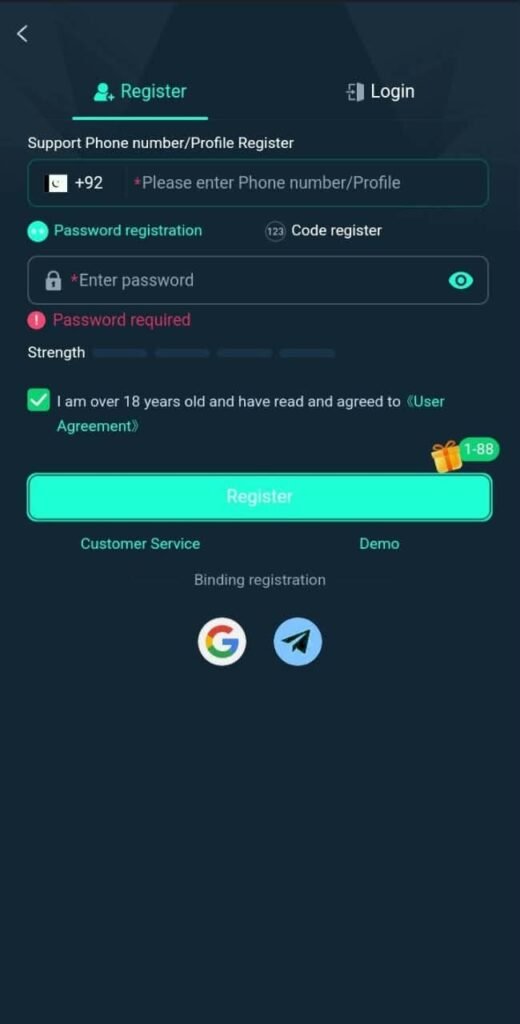
If login fails, check your username, registered contact details, and password for typing errors. If you have forgotten your password, use the available recovery process.
Never share your password or one-time verification code with someone claiming to provide account support. If you suspect unauthorized access, secure your account through the verified recovery process and contact the provider if a reliable support channel exists.
How to Use the App?
Once you have confirmed the platform’s identity and accessed its interface, take time to understand the available sections.
Start by reviewing the main menu, account settings, help information, and game instructions. Check the rules of each game before participating, and avoid selecting options you do not understand.
If account or payment features are available, read their terms before using them. Keep your login details private and sign out when using a shared device.
New users should explore the available information first rather than rushing into registration or financial transactions.
Payment, Deposit, and Withdrawal Information
Reliable information about S1 Game payment methods, deposit limits, withdrawal conditions, and processing times could not be independently verified.
If the actual service supports financial transactions, review the following details before paying:
- Accepted payment methods.
- Minimum and maximum transaction limits.
- Deposit and withdrawal fees.
- Processing times and verification requirements.
- Rules for cancelled or pending transactions.
- Conditions that apply to account balances.
Do not assume that Easypaisa, JazzCash, bank transfers, or any other payment method is supported unless the verified platform confirms it.
Keep transaction receipts and reference numbers. Never send money to an unknown person who promises to activate your account or release a withdrawal. Avoid paying unexpected extra fees to unlock supposed rewards.
If real-money gaming is involved, remember that losses are possible. Do not use borrowed money or funds needed for household expenses.
Bonuses and Promotions
No current S1 Game bonus or promotional offer has been independently verified for this article.
If the platform advertises a promotion, read its full terms before accepting it. Check eligibility rules, expiry dates, wagering conditions where applicable, withdrawal restrictions, and other requirements.
Be cautious of messages promising guaranteed rewards or asking for an upfront payment to release a bonus. A promotional claim alone does not prove that an offer is genuine.
Only rely on information published through a service you have independently verified.
User Experience and Feedback
A useful gaming experience depends on factors such as interface design, device compatibility, connection quality, clear instructions, and responsive support.
However, verified user reviews and independent performance information for S1 Game were not available for this article. It would therefore be misleading to claim that users universally consider it fast, reliable, or easy to use.
Before deciding whether to use the service, look for independent feedback and check when reviews were published. Pay attention to repeated complaints about account access, unclear fees, suspicious downloads, or unresolved transactions.
Treat unusually positive reviews with caution when they lack meaningful details or appear to make unrealistic promises.
Safety and Security Tips
Protecting your device and personal information should be a priority when exploring any unfamiliar gaming service.
- Download files only from sources you can verify.
- Keep your operating system and security software updated.
- Review application permissions before granting access.
- Use a unique and strong password.
- Never share passwords or verification codes.
- Avoid suspicious links and unexpected messages.
- Read the privacy policy and service terms.
- Check local legal requirements and age restrictions.
If the service involves financial activity, set a personal spending limit and do not treat gaming as a dependable source of income. Stop if the platform’s identity, rules, or payment requirements cannot be verified.
Pros and Cons
The following points are general considerations rather than verified ratings of S1 Game.
Pros
- A compatible mobile platform may offer convenient access.
- Clear menus can make navigation easier.
- Written instructions can help beginners understand the rules.
- Account controls may help users manage their information.
- Transparent policies can support informed decisions.
Cons
- The current version and file size are unverified.
- Android and iOS compatibility are not confirmed.
- Payment methods and withdrawal rules are unknown.
- Independent user feedback is unavailable.
- Unverified downloads may create security risks.
Tips for New Users
If you are considering S1 Game for the first time, take a few practical steps before proceeding.
First, confirm the platform’s identity and review its current information. Second, check device compatibility and use only a download source you can trust. Third, understand the registration process, privacy policy, and account security options.
If payment facilities exist, read the transaction rules and check all charges before making a deposit. Avoid borrowing money or relying on claims of guaranteed rewards.
Finally, follow applicable local requirements and stop if you encounter suspicious requests or unclear terms.
Frequently Asked Questions

What is S1 Game?
How can I download S1 Game?
Is S1 Game compatible with Android?
How can I register an account?
Are deposit and withdrawal options available?
How can I use the platform safely?
Conclusion
S1 Game may interest users searching for mobile gaming options, but important details about its current version, device support, features, payments, and promotions remain unverified.
Before downloading an application or creating an account, confirm the provider’s identity, review the service terms, and check compatibility with your device. If financial transactions are offered, understand the risks and conditions before making any payment.
What's new
S1 Game is a mobile gaming platform for users who want to explore different gaming options through a simple interface. This guide covers available game information download and installation steps registration login guidance and account safety tips. Before getting started check device compatibility review the platform's terms and verify any payment or promotion details through reliable sources.