MB666 Game APK Download Launch free For Android 2026
5 MB
v1.1.78
Android 6+
500+
Description

MB666 Game is a mobile gaming platform designed for users who enjoy exploring different digital entertainment options on Android devices. It provides an app-based experience where users can explore available sections, check different features, and learn about the main account options. Its mobile interface is designed to help users move between different sections and understand the available options more easily.
This guide provides useful information about the MB666 Game, including its main features, categories, home screen, and dashboard. It also explains the basic APK download process, Android installation, account registration, login steps, and general settings. Beginners can use this guide to understand the platform before getting started.
Before downloading, always check the APK source, latest version information, and device compatibility. Make sure your Android phone has enough storage space and keep your personal account details private. Also try this K666 Game
What Is MB666 Game?
MB666 Game is a name that users may come across when searching for mobile gaming applications. People interested in this platform may want to understand its interface, available gaming categories, account options, and Android installation process. Learning about these basic details can help beginners become familiar with the platform before exploring its available features.
Before downloading, it is important to identify the correct application and its publisher. Similar app names may refer to different platforms, so users should carefully review the website, application details, and available version information. This guide also covers basic installation steps, device compatibility, and useful account safety tips to help Android users make informed decisions.
MB666 Game Overview
Mobile gaming applications can bring different entertainment options together in one place. A typical platform may include a home screen, game library, user profile, settings, and help section.
The exact layout and available services can depend on the application version. Beginners should explore each section carefully and read the instructions displayed inside the app before using its options.
App Information and Details
| App Detail | Information |
|---|---|
| App Name | MB666 Game |
| App Type | Casino Games |
| App Category | Games |
| Latest Version | v1.1.78 |
| APK Size | 5 MB |
| Android Support | Android 6+ |
| Downloads | 500+ |
| User Rating | 4.1/5 |
| Total Votes | 199 |
| Platform | Android |
| App Status | New |
| Price | $1.00 |
| Language | Check available settings |
| Developer | Verify publisher information |
Note: Version, file size, compatibility, and other app details should be checked against the actual download source before installation.
Main Features of MB666 Game
A mobile gaming application may provide several useful sections to make navigation easier. Depending on the verified version, users can look for the following options:
- Simple Interface: A layout designed to help users find different sections.
- Game Library: A central place to browse available games.
- Category Menu: Separate sections for different game types.
- User Profile: An area for viewing account information.
- Account Access: Login and registration options, if provided.
- App Settings: Controls for supported application preferences.
- Help Section: Information for common questions.
- Update Information: Details about newer application releases.
- Activity History: A record of available account activities, if supported.
- Mobile Access: An interface designed for compatible mobile devices.
These are features to check for, not a guarantee that every option is included in every MB666 release.
MB666 Game Categories and Available Options
The game library is an important section for users who want to explore different types of mobile entertainment. The actual categories should be confirmed inside the installed application.
Depending on the available version, users may look for categories such as:
- Card Games: Digital card-based entertainment.
- Puzzle Games: Activities involving matching, patterns, and logical thinking.
- Arcade Games: Short interactive games with simple controls.
- Casual Games: Easy-to-understand options for shorter sessions.
- Sports Games: Sports-themed digital activities, if available.
- Number Games: Games based on numbers and different combinations.
- Slot-Style Games: Reel-based entertainment, if included.
- Other Games: Additional options displayed in the current game library.
Not every category listed above is confirmed for MB666. The app’s own game menu should be treated as the accurate source for its available selection.
Home Screen and Dashboard
The home screen is usually the first section users see after opening a mobile application. It may display the app logo, navigation menu, featured sections, and shortcuts to important options.
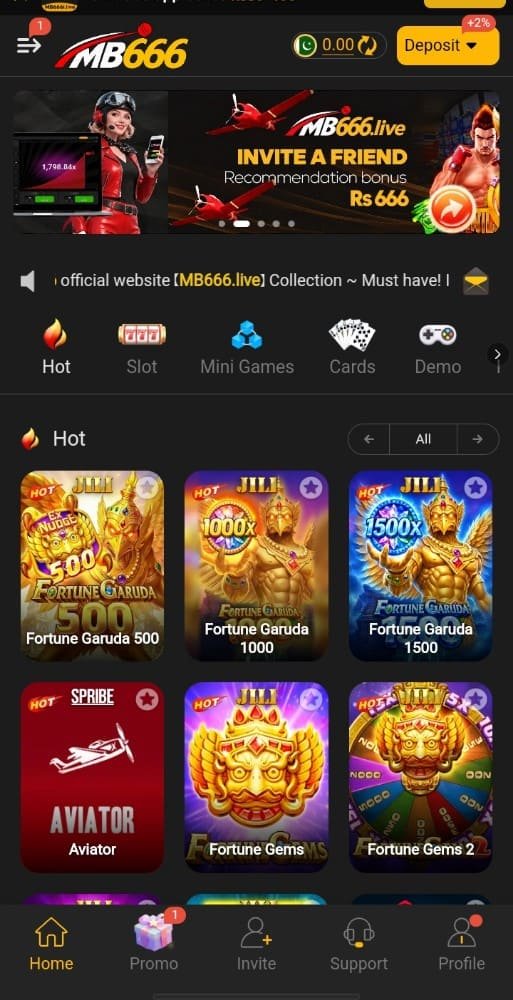
New users should take a moment to understand the dashboard before opening other sections. Check the labels and icons carefully so you can find the required options without confusion.
Navigation Menu and App Layout
A navigation menu helps users move between different parts of an application. Depending on the interface, it may provide access to:
- Home
- Game categories
- User profile
- Account settings
- Activity information
- Announcements
- Help and support
Some versions may use a bottom navigation bar, while others may display a side menu or separate buttons. The available layout can change after an update.
User Profile and Account Information
The profile section may display basic information connected to a user’s account. It can also provide access to account preferences and other available profile options.
When reviewing this section, check that the displayed information is correct. Avoid sharing personal account details, passwords, or verification codes with unknown individuals.
How to Download MB666 Game APK
Android users who find an APK download option should verify the file before saving it to their phones.
Follow these general steps:
- Open a trusted website apklogic.com.pk that clearly identifies the application.
- Check the app name and publisher information.
- Review the available version and file size.
- Read the Android compatibility details.
- Find the APK download option, if available.
- Tap the download link.
- Wait for the file to finish downloading.
- Locate the file in your phone’s Downloads folder.
Do not install a file if the website provides unclear information or redirects you to an unrelated download page.
How to Install the Application on Android
After downloading a verified APK file, follow these steps to install it:
- Open the Downloads folder on your Android phone.
- Find the downloaded APK file.
- Tap the file to begin installation.
- Review the installation message.
- Allow installation from that source only if you trust it.
- Follow the instructions displayed on your screen.
- Wait for the installation process to finish.
- Open the application from your app menu.
Android settings may look different depending on your phone brand and operating system version.
Android Requirements and Compatibility
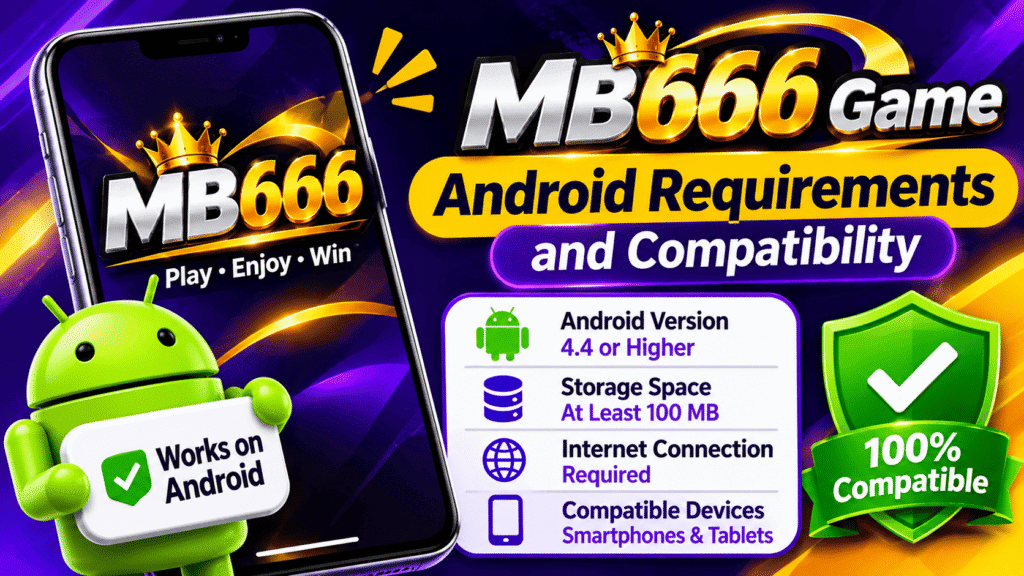
Before installing an application, check whether your device meets its requirements. Compatibility can depend on the Android version, available storage, processor, and other technical details.
Here are some useful checks:
- Confirm the minimum Android version from the download page.
- Keep enough free storage available.
- Use a stable internet connection.
- Update your Android system when appropriate.
- Check whether your device supports the application.
- Review any installation message shown by Android.
Do not assume that an APK will work on every Android phone. Always follow the requirements provided with the actual release.
How to Register a New Account
If the application provides a registration option, new users may be able to create an account through its sign-up page.
A general registration process includes:
- Open MB666 Game the application.
- Find the Register or Sign Up option.
- Review the information requested.
- Enter the required details.
- Create a strong password.
- Complete any verification displayed on the screen.
- Read the applicable account terms.
- Check your information carefully.
- Submit the registration form.
Only provide necessary information through a verified application or website. Never share your verification code with another person.
How to Login to an Existing Account
Users with an existing account can look for the login option on the opening screen or navigation menu.
Follow these general instructions:
- Open the MB666 Game application.
- Select Login.
- Enter your registered username or mobile number, if requested.
- Type your password.
- Review the entered details.
- Complete any requested verification.
- Select the login button.
- Wait for the account page to load.
If the details are not accepted, check your spelling and internet connection before trying again.
Password Recovery and Account Access
Sometimes users may forget their password or experience difficulty accessing an account. If a recovery option is available, it may help them reset their login details.
Look for options such as Forgot Password or Account Recovery. Follow the instructions displayed on the verified recovery page.
For better account protection:
- Create a password that is difficult to guess.
- Avoid reusing passwords from other websites.
- Keep verification codes private.
- Do not save login details on shared devices.
- Log out when using someone else’s phone.
App Settings and Personal Preferences
The settings section may allow users to manage different application preferences. The available controls depend on the version and design.
Possible settings to look for include:
- Account preferences
- Password management
- Language selection
- Notification controls
- Display preferences
- Sound settings
- Privacy information
- Help and support
Review each setting before changing it. If an option is not visible in your version, do not assume that the application supports it.
Language and Display Options
Some mobile applications provide language and display preferences to make navigation easier. If MB666 Game includes these controls, users may find them under Settings or Profile.
Check whether the available language matches your preference. You can also review display and sound controls if they are provided.
Remember that language options may differ between versions, and an Urdu option should not be assumed unless it is actually displayed.
Notifications and Announcements
Notifications can help users stay informed about MB666 Game messages and updates. If this section is available, it may contain announcements, account information, or general platform notices.
Users should review notifications carefully and open only relevant messages. Avoid following unexpected links or sharing private information in response to messages from unknown accounts.
You can also check your phone’s notification settings if you want to manage which app alerts appear on your screen.
Balance, Activity, and Payment Information
If the MB666 Game provides account balance or payment-related sections, review their instructions before using them. These areas may contain information about account activity, available methods, or transaction records.
Before completing any payment-related action:
- Read the displayed instructions.
- Check the recipient information carefully.
- Review any applicable limits or conditions.
- Keep a record of completed activity.
- Check the status before repeating an action.
- Contact the listed support service if information is unclear.
Available methods, processing details, and account conditions must be confirmed inside the current platform. Never rely on an unverified payment link or message.
Promotions, Events, and Special Offers

Some mobile platforms display announcements, promotional campaigns, or special events. If such a section is available, users can review its information to understand the conditions.
Before joining an offer, check:
- Eligibility requirements
- Start and end dates
- Applicable conditions
- Any activity requirements
- Availability for your account
- Relevant platform rules
Promotional information can change over time. Do not assume that an older offer is still available or that every account receives the same options.
Customer Support and Help Center
A help or support section can assist users who have questions about installation, account access, settings, or technical issues. If support information is available, check the application or its verified website for the correct contact method.
When requesting assistance, explain the issue clearly and include any relevant error message. Never send your password, private verification code, or sensitive account information to someone claiming to be a support representative. Support options and response times may vary.
Privacy, Safety, and Common Problems
Before installing or using any mobile application, take time to review its privacy information and requested permissions.
Useful safety practices:
- Download MB666 Game APK files only from sources you can verify.
- Check the publisher and application details.
- Review permissions before installation.
- Keep your phone’s security features enabled.
- Use a strong and private password.
- Avoid unknown links and unexpected downloads.
- Read the platform’s terms and privacy information.
Common problems and basic checks:
| Problem | What to Check |
|---|---|
| APK will not download | Check internet access and available storage |
| Installation fails | Review Android compatibility |
| App does not open | Restart your phone and try again |
| Login does not work | Check your account details |
| Screen loads slowly | Check your internet connection |
| Menu is not visible | Review the app version and layout |
| Notifications do not appear | Check phone notification settings |
| An option is missing | Confirm whether it is supported in your version |
If a problem continues, use the support details provided by a verified source. Avoid installing unknown files to fix application errors.
Conclusion
MB666 Game is a name that users may encounter while exploring Android gaming applications. This guide explained the important areas beginners should understand, including app information, game categories, home screen, APK installation, account access, settings, notifications, support, and basic safety practices.
Before downloading the application, verify its publisher, file details, Android requirements, and available features. The actual game library and supported options should always be checked in the current version rather than assumed from similar app listings. Taking these simple steps can help beginners understand the application and make informed decisions while exploring its available sections.
Frequently Asked Questions About MB666 Game
1. What is MB666 Game?
MB666 Game is a mobile gaming platform that users can explore through its available application or supported interface. Its features may vary by version.
2. How can I download MB666 Game?
Check the available APK file, version information, and source before downloading. Make sure the file is suitable for your Android device.
3. How do I register on MB666 Game?
Open the available platform and select the Register option if provided. Follow the on-screen instructions and carefully review your details before submitting them.
4. What should I do if I cannot log in?
Check your login details and internet connection. If you still cannot access your account, use the available password recovery or support option.
5. Is MB666 Game compatible with Android phones?
Compatibility depends on the application’s actual requirements and your device specifications. Check the latest version details before installation.
6. How can I keep my account secure?
Use a strong password and keep your personal information private. Never share your password, OTP, or verification codes with unknown people.
Disclaimer
This article about MB666 Game is published for informational purposes only. We are not affiliated with the platform or its developers. Before downloading or using the application, verify the file source, version details, permissions, privacy policy, and applicable terms. Features and availability may change over time. Always protect your personal information and follow the rules applicable in your region.
What's new
MB666 Game provides a mobile gaming experience for users who want to explore different entertainment options on Android devices. Its available sections and navigation features can help beginners understand the app layout. Before downloading, check the latest version, device compatibility, APK source, and available features for a better-informed experience.