555UV Game APK Download Free Guide for Android Users
Just Now
7.6 MB
v 1.1.8
Android
65k+

Description
Mobile gaming is now a common part of everyday life. Many people enjoy exploring Android applications because they can access different entertainment options directly from their phones. A good mobile platform should be easy to understand, simple to navigate, and comfortable for new users. Clear information also helps people decide whether an application meets their needs.
555UV Game is the main topic of this guide. This article explains the platform, Android application access, basic installation steps, account registration, login process, and useful tips for beginners. It also covers a few important things users should check before downloading an APK file.

If you are searching for information about this platform, this guide will help you understand the basic process. Read each section carefully and check the latest details before installing anything on your device.
What Is 555UV Game?
555UV Game is an Android gaming platform that users may explore for mobile entertainment. People searching for a new gaming application often want to know how it works, how to access it, and what steps are involved in creating an account.
Before using any platform, it is important to review its available information. Check the application description, developer details, supported Android version, and latest update information. These details can help you understand the software before installing it.
The interface and available options may change between versions. For this reason, users should not depend on outdated screenshots or descriptions. Always check the latest information from the source providing the application.
555UV Game Overview
A basic application overview helps beginners understand the information they should look for before installation. It also makes it easier to compare an application with other Android platforms.
| App Information | Details |
|---|---|
| App Name | 555UV Game |
| Platform | Android |
| App Type | Gaming Platform |
| File Format | APK, if provided |
| Device | Compatible Android phones |
| Language | Check the current app version |
| Developer | Verify from the official listing |
| Latest Version | Check the available release |
| Category | Mobile Gaming |
Some information may not be publicly confirmed. Always use the latest application listing for accurate technical details.
Why Are Users Interested in 555UV Game?
Android users usually prefer applications that are easy to access and understand. Complicated menus can make a new platform difficult for beginners, while clear navigation creates a better experience.
555UV Game may attract searches from people who want to learn about its mobile application and basic account process. However, popularity should not be judged through search interest alone. Users should examine the available information and decide whether the platform meets their expectations.
A useful application guide should explain the basic process instead of making unrealistic statements. This helps readers understand what they are downloading and what information they need before getting started.
Main Features to Explore
Before using a new mobile application, take some time to understand its interface and available sections. The following points are useful areas to check when reviewing a gaming platform.
Application Interface
The interface is one of the first things users notice. Clear menus, readable text, and organised sections can make an application easier to explore. Beginners should look for simple navigation rather than complicated layouts.
Mobile Compatibility
Android applications can have different device requirements. Check the minimum Android version, available storage, and other installation details before downloading a file. Compatibility information helps prevent unnecessary installation problems.
Account Options
Some gaming platforms provide account registration and login sections. Users should read the instructions carefully and understand which details are required. Never enter personal information on an unverified page.
Navigation and Menus
Well-organized menus help users locate different application sections. Before using any option, read its description and follow the instructions displayed on the screen.
Application Updates
Updates can include software improvements, compatibility changes, and interface adjustments. Check the release information before replacing an older version with a new APK file.
Help and Support
Clear support information is useful when users experience account or installation difficulties. Check whether the platform provides a reliable contact method and understandable instructions.
Pros and Cons
| Pros | Cons |
|---|---|
| Mobile gaming platform | Verified details may be limited |
| Android-focused information | Compatibility may vary |
| Basic account guidance | Some features need confirmation |
| Simple installation guidance | Updated information may be required |
| Beginner-friendly instructions | Support details should be checked |
How to Download 555UV Game APK on Android
Downloading an Android application requires attention, especially when the file comes from outside the Google Play Store. Follow these general steps and verify the source before proceeding.
- Open the website or source that provides the application apklogic.com.pk
- Find the correct Android application page.
- Check the application name and developer information.
- Review the available version and file details.
- Confirm that your phone meets the listed requirements.
- Select the download option if you trust the source.
- Wait until the APK file finishes downloading.
- Check the downloaded file before opening it.
555UV Game should only be downloaded from a source that provides clear and reliable information. Avoid unknown download buttons, misleading advertisements, and files with unclear names.
How to Install the APK File
After downloading an APK, you can follow the normal Android installation process. The exact steps may differ depending on your phone brand and Android version.
First, open your phone’s file manager and locate the downloaded APK. Tap the file to begin the installation process. If Android displays a permission message, read it carefully and only continue when you trust the source.
Once installation finishes, you can look for the application icon in your app list. Open it and review the available instructions.
If the installation does not work, check the following points:
- Make sure the file has downloaded completely.
- Check whether enough storage space is available.
- Confirm that the APK supports your Android version.
- Remove an incomplete download and obtain the correct file.
- Avoid installing modified or unknown application files.
How to Register a New Account
Some platforms require an account before users can access their available sections. If registration is provided, read the instructions on the application screen.
The general process may include these steps:
- Open the installed application.
- Find the registration or sign-up option.
- Read the account instructions.
- Enter only the information requested by the verified platform.
- Check your details before submitting them.
- Follow any verification instructions shown on the screen.
When creating an account on 555UV Game, use a strong password that you do not use on other websites. Do not share verification codes or private account details with anyone.
How to Login
Returning users may find a login option on the application screen. The process usually requires the account details created during registration.
Follow these basic steps:
- Open the application on your Android phone.
- Select the login option.
- Enter your registered account information.
- Review the details for typing mistakes.
- Follow any additional instructions.
- Wait for the application to process your request.
If you cannot access your account, check the entered information first. Use the official recovery instructions if they are available. Avoid sharing your password with another person.
Deposit and Withdrawal
Users often want to understand the deposit and withdrawal process before using an online gaming platform.
If 555UV Game provides payment options, check the available methods, minimum and maximum limits, transaction conditions, and applicable instructions before proceeding.

Deposit Guide: Read the payment instructions carefully. Confirm the displayed details before making any transaction. Never send money to an unverified account.
Withdrawal Guide: Check the withdrawal requirements, processing information, and applicable conditions. Do not assume a specific processing time unless the platform clearly confirms it.
Important: Deposit and withdrawal methods have not been independently verified, so no specific payment method or transaction guarantee should be claimed.
Customer Service
For help with 555UV Game, users should check the app’s available support section for assistance with account access, login difficulties, installation issues, or general questions. Always use verified support channels and avoid sharing passwords, OTPs, or sensitive personal information.
Important Things to Check Before Using the Platform
Before exploring 555UV Game, take a few minutes to review its source and application details. This small step can help you make a more informed decision.
Check the developer name and available contact information. Read the privacy policy to understand how personal information may be handled. Also, review the permissions requested by the application.
Be careful if an application asks for permissions that do not appear necessary for its basic purpose. You should understand why a permission is requested before allowing access.
Keep your Android operating system updated whenever possible. A screen lock and strong account password can also help protect your device and personal information.
Tips for Beginners
New users should start by understanding the application instead of rushing through its different sections. A little preparation can make the experience easier.
- Read the instructions before selecting an option.
- Keep your application updated through a trusted source.
- Use a strong and unique password.
- Never share private account information.
- Check your phone storage before installation.
- Avoid unknown files and suspicious links.
- Review the platform’s available terms and privacy information.
- Contact verified support if you need assistance.
These simple habits are useful when exploring almost any Android gaming platform.
Common Problems and Their Solutions
| Common Problems | Possible Solutions |
|---|---|
| Installation Error | Check APK compatibility and available storage. |
| Application Not Opening | Restart your phone and try again. |
| Login Problem | Check your account details carefully. |
| Slow Performance | Close unnecessary background applications. |
| Download Interruption | Use a stable internet connection. |
| Update Problem | Check for the latest compatible version from a trusted source. |
Is 555UV Game Suitable for Beginners?
555UV Game may interest Android users who are looking for information about a mobile gaming platform. However, beginners should not make a decision based only on promotional descriptions or attractive screenshots.
Check the application interface, installation requirements, account instructions, and privacy details. If important information is missing, take time to verify it before using the platform.
A beginner-friendly application should provide understandable instructions and clear information. Users should feel comfortable exploring its options without being pressured to share unnecessary details.
Frequently Asked Questions
1. What Is 555UV Game?
555UV Game is an Android gaming platform. Users should check its available information, features, and terms before installing the application.
2. How Can I Download 555UV Game?
Visit a trusted source to check whether the 555UV Game APK is available. Review the file and device requirements before downloading.
3. How Do I Install 555UV Game on Android?
Download the APK from a trusted source, open the file, and follow the installation instructions. Make sure your device supports the application.
4. How Can I Register on 555UV Game?
If registration is available, open the application and follow its official sign-up instructions. Enter only the information required by the platform.
5. How Can I Log In to 555UV Game?
Open the application and use your registered login details if an account is supported. Keep your password private and secure.
6. Does 555UV Game Offer Bonuses?
Bonus availability and promotional terms may vary. Check the latest official information to understand eligibility and conditions.
7. Is 555UV Game Safe to Use?
Safety cannot be guaranteed without verifying the application. Check its source, permissions, privacy policy, and security before installing or sharing personal information.
Conclusion
Choosing a new Android application requires a little research. Users should understand the installation process, check compatibility, and review privacy information before getting started. These steps are important for beginners as well as experienced Android users.
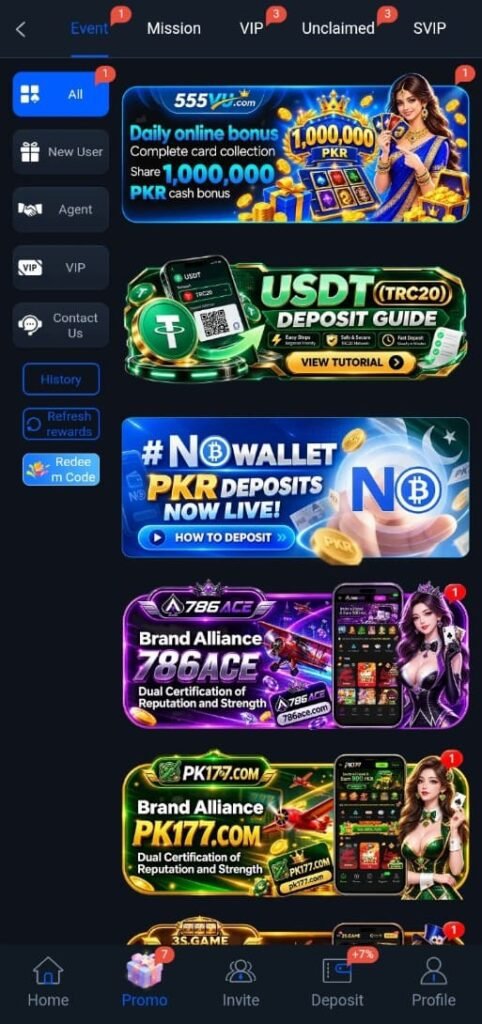
555UV Game is the subject of this guide, covering its general introduction, APK access, installation, registration, login, and basic user tips. Always verify the latest application information before downloading a file. Make careful decisions, protect your personal details, and use mobile applications responsibly.
Disclaimer
This article about 555UV Game is provided for informational and educational purposes only. We are not affiliated with the app developers. Users should verify app details, download sources, permissions, and applicable terms before installation. Use the application responsibly and at your own discretion.
What's new
555UV Game is an Android gaming platform designed for mobile users. Explore its application details basic features download process installation steps registration and login guide. This overview helps beginners understand the platform and get started with clear information.