444HQ Game Download APK Free For All Android Users in Pakistan
15.96 MB
V1.5
Android 4+
165k+
Description

444HQ Game is a mobile gaming platform for people who enjoy exploring different types of games and digital entertainment on their smartphones. It provides a convenient way to discover available gaming categories, browse app sections, and access basic account options in one place. Its simple interface can help new users understand the main features without dealing with complicated menus.
For Android users, the 444HQ Game APK offers an app-based way to access the platform from a compatible mobile device. Users can explore its available options, check account settings, and learn about the latest changes through the application. The experience may vary depending on the installed version and device compatibility.
If you are discovering platform for the first time, this guide will help you understand its basic features, download and installation process, registration steps, and other important details. Before getting started, always check the available app information, use a trusted download source, and review the platform’s terms to make informed decisions. How many also try this TD999 Game, 1777PKR Game, 555JC Game
What Is 444HQ Game and How Does It Work?
444HQ Game is a mobile gaming platform for users who enjoy exploring different gaming options and digital entertainment on their smartphones. It provides an app-based experience where users can browse available game categories, check different sections, and access basic account features. The platform is intended to make mobile browsing simple, so beginners can explore its main options without needing advanced technical knowledge.
The 444HQ Game APK is an Android installation file that allows users to install the application on a compatible smartphone. After installation, users can open the app, review its available sections, and follow the on-screen instructions to understand how the platform works. Some features may require account registration before they become accessible.
What Is 444HQ Game and How Does It Work?
444HQ Game is a mobile gaming platform for users who enjoy discovering different types of digital games through their smartphones. It brings various gaming options and account-related sections together in one place, giving users a convenient way to explore the available features. Its straightforward interface can make navigation easier for beginners as well as regular mobile users.
The 444HQ Game APK is an Android installation file that users may download to access the application on a compatible device. After installation, users can open the app and explore its main sections. Depending on the platform’s current version, some features may require account registration or additional verification.
How Does 444HQ Game Work?
Using application is generally simple. Users can follow these basic steps to explore the application:
- Download: Get the APK file from a trusted source.
- Install: Open the file and follow the Android installation instructions.
- Register: Create an account if registration is required.
- Explore: Browse the available menus and game categories.
- Check Rules: Read the instructions before trying any game.
- Manage Account: Review your profile and account settings.
What Can New Users Expect?
New users can explore the app’s main sections, learn how its features work, and check the available gaming options. Before getting started, review the app version, device compatibility, and usage instructions. Keep your account details private and always use a trusted download source.
444HQ Game APK – Complete App Information
444HQ Game APK is a mobile application for Android users interested in exploring different gaming options. It provides access to available game categories and basic account features through a simple, mobile-friendly interface.
Before installing 444HQ Game, check the app version, file size, device compatibility, and required permissions. These details can help beginners understand the application and prepare their devices.
Key Information to Know
| App Details | Information |
|---|---|
| App Name | 444HQ Game |
| File Format | APK |
| App Type | Mobile Gaming |
| Platform | Android |
| Category | Mobile Games |
| Internet | Required |
| Registration | May Be Required |
| Developer | 444HQ |
| Latest Version | V1.5 |
| File Size | 15.96 MB |
What Should Users Check Before Installation?
- App Version: Check the available version before downloading.
- File Size: Review the APK size.
- Device Support: Confirm Android compatibility.
- Permissions: Review requested app permissions.
- Download Source: Choose a trusted source.
Application details may vary between versions. Always check the available information before installation and keep your device secure.
Main Features of 444HQ Game
Platform offers a mobile-based experience for users who want to explore different gaming options through their smartphones. Its main features focus on simple navigation, account access, and easy browsing. Here are some features users may explore.
Simple User Interface
The application aims to provide a clean and straightforward interface. Users can browse different sections and understand the main menu without complicated steps.
Multiple Game Categories
Users may find different gaming categories depending on the available version. This gives them an opportunity to explore various options in one application.
Easy Navigation
The menu structure helps users move between available sections. Beginners can explore the application and become familiar with its basic options.
Account Management
Users may access account-related settings after registration. These options can help them review their profile and manage basic account information.
Mobile-Friendly Design
The application is intended for smartphone use, allowing users to access its available sections from compatible Android devices.
Simple Registration Process
If registration is required, users can follow the on-screen instructions to create an account. They should always provide accurate information and protect their login details.
Application Updates
New versions may include interface improvements, technical fixes, or changes to available sections. Users should check version information before updating.
Customer Support Options
A help or contact section may be available for general questions and technical assistance. Check the application for verified support details.
Account Settings
Users may find basic settings for reviewing their account information and available preferences.
Note: These features are general points to check, not independently confirmed specifications of 444HQ Game. Actual options may differ depending on the application version.
User Interface and App Navigation
A simple interface makes it easier for users to understand and explore a mobile application. 444HQ app is presented as a mobile gaming platform where users can browse available sections and find different options through the main menu.
New users can start by opening the application and becoming familiar with its menus. They should check the profile section, available game categories, account settings, and help options to understand how everything is organized.
The following points can help beginners:
- Main Menu: Explore the available sections from the home screen.
- Game Categories: Check which gaming options are available.
- Profile Section: Review basic account information.
- Settings: Explore available preferences and options.
- Help Section: Look for support information when needed.
Overall, take a little time to explore the interface before using different features. This can make navigating the application easier and more comfortable. Actual menus may vary depending on the app version.
How to Download 444HQ Game APK for Android
Downloading an Android application is simple when you follow the correct steps. If you want to explore 444HQ Game, first check the available APK information and make sure the file is suitable for your smartphone.
Follow this beginner-friendly guide to understand the general download process.
Find a Trusted Download Source
Visit a source you can verify that provides the 444HQ Game APK. Check the app name and available file information before proceeding.
Check APK Details
Before downloading, review the version, file size, Android requirements, and application permissions. Make sure the information is clear.
Download the APK File
Tap the download option and wait for the file to save to your Android device. A stable internet connection can help avoid interrupted downloads.
Locate the Downloaded File
Open your phone’s File Manager and visit the Downloads folder. Find the APK file you have just downloaded.
Review Installation Permission
If Android asks for permission to install an application from that source, review the request carefully. Only continue if you trust the file source.
Install the Application
Tap the downloaded APK file and follow the on-screen instructions. Wait until the installation process is complete.
Open the App
After installation, find the application icon on your phone and open it. Review the available sections and follow any required setup instructions.
Important Tips Before Downloading
- Use a trusted games download source apklogic.com.pk
- Avoid modified or unknown APK files.
- Check available storage space.
- Review app permissions carefully.
- Keep your Android device updated.
- Do not share passwords or verification codes.
Note: The current official version, file size, and Android requirements for app have not been independently verified. Always check these details before installation.
How to Install 444HQ Game on Your Android Phone
Installing an APK file on an Android phone is usually straightforward. If you have downloaded the 444HQ Game APK from a trusted source, follow these simple steps to understand the installation process.
Open File Manager
Open the File Manager on your Android phone and find the downloaded APK file in the Downloads folder.
Select the APK File
Tap the downloaded file to start the installation process. Check the app name before continuing.
Review Installation Permission
If your phone requests permission to install apps from that source, review the request and allow it only if you trust the source.
Start Installation
Tap the Install option and wait while Android completes the process.
Open the Application
Once installation finishes, tap Open to launch the application.
Explore Available Sections
Follow the on-screen instructions and explore the available menus and account options.
Tips for Smooth Installation
- Keep enough storage space available.
- Use a compatible Android device.
- Download files from trusted sources.
- Review requested permissions.
- Keep your phone software updated.
Important: If installation fails, check device compatibility and file integrity. Do not disable Android security protections to force an installation. Actual installation requirements may vary by app version.
How to Register a New Account on 444HQ Game
Creating a new account is usually the first step when accessing an application that requires registration. If 444HQ application provides a registration option, users can follow the general steps below to understand the process.
Open the Application
Launch the installed application on your Android phone and wait for the main screen to appear.
Find the Register Option
Look for the Register or Sign Up option on the welcome screen and tap it.
Enter Required Details
Fill in the requested information carefully. Only provide details that are necessary and appropriate.
Create a Password
Choose a strong, unique password to help protect your account. Avoid using passwords from other websites.
Complete Verification
If the application requires verification, follow the instructions shown on the screen. Never share your OTP or verification code with another person.
Submit Your Information
Review the entered details and submit the registration form if you agree with the platform’s terms.
Access Your Account
If registration is successful, follow the on-screen instructions to access your account.
Tips for New Users
- Enter accurate information.
- Use a strong password.
- Keep login details private.
- Read the platform’s terms.
- Avoid sharing personal information unnecessarily.
Note: The actual registration fields and verification process for 444HQ platform have not been independently confirmed. Follow only the instructions provided by a verified platform source.
How to Log In to Your 444HQ Game Account
After creating an account, users may need to log in to access the application’s available sections. The login process is generally simple and can be completed by following a few basic steps.
Open the Application
Launch 444HQ Game on your Android phone and wait for the home screen to load.
Select the Login Option
Find the Login or Sign In button and tap it to open the account access page.
Enter Your Account Details
Provide the registered username, phone number, or other requested login information.
Enter Your Password
Type your account password carefully and check for typing mistakes.
Complete Verification
If additional verification is requested, follow the instructions displayed on the screen.
Access Your Account
Tap the Login button and wait for the application to process your details.
Tips for a Smooth Login
- Check your internet connection.
- Enter the correct account details.
- Keep your password private.
- Never share your OTP with anyone.
- Use the official password recovery option if you forget your password.
Note: The exact login method may vary depending on the current application version. Use only verified account access options.
Deposit and Withdrawal on 444HQ Game
Before using any deposit or withdrawal option on 444HQ Game, check the available payment methods and read the platform’s terms carefully. Payment services, transaction limits, and processing times have not been independently verified.
Deposit Information
If a deposit option is available, review the instructions shown in your account. Check the payment details carefully before confirming a transaction. Avoid sending money to unknown accounts.
Withdrawal Information
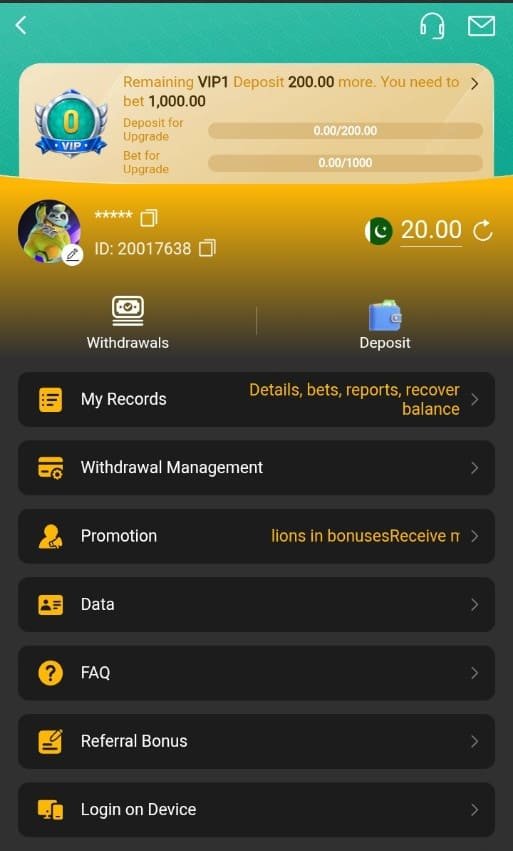
Before requesting a withdrawal, review the available rules and account requirements. Make sure your account details are correct and keep transaction records for reference.
Important Payment Tips
- Check available payment methods.
- Review transaction fees and conditions.
- Never share your password or OTP.
- Keep payment receipts for reference.
- Avoid payments when the service details are unclear.
Note: The deposit and withdrawal services of 444HQ Game have not been independently verified. Confirm all payment information before making any financial transaction.
Device Compatibility and Android Requirements
Before installing 444HQ Game, users should check whether their Android phone supports the application. Device compatibility can depend on the app version, Android operating system, available storage, and internet connection.
Basic Device Requirements
| Requirements | Details |
|---|---|
| Device Type | Android Smartphone |
| Operating System | Version Not Confirmed |
| Storage Space | Check APK Size |
| RAM | Not Confirmed |
| Internet | Required |
| Processor | Not Confirmed |
| Installation | APK File |
Tips for Better Compatibility
- Keep your Android software updated.
- Make sure your phone has enough free storage.
- Use a stable internet connection.
- Check the APK file before installation.
- Review app permissions carefully.
Important: The exact Android version, RAM, and storage requirements for 444HQ Game have not been independently verified. Check the latest application information before downloading.
Safety, Privacy and Important User Tips
When using any mobile application, keeping your personal information safe should always be a priority. 444HQ Game users should follow basic security practices and understand the app’s privacy information before creating an account or exploring its features.
Protect Your Personal Information
Avoid sharing private details with unknown people. Use only the information required for account access and keep your personal data secure.
Create a Strong Password
Choose a unique password that is difficult to guess. Avoid using the same password across multiple applications.
Review App Permissions
Before installation, check which permissions the application requests. Allow only those that are necessary for the app to work.
Use a Trusted Download Source
Download APK files only from sources you can verify. Avoid modified files and unknown download links.
Keep Your Device Updated
Install Android security updates when available. This helps keep your smartphone protected.
Check Privacy Information
Read the available privacy policy and terms to understand how your information may be collected, used, or stored.
Important Tips for Users
- Never share passwords or OTP codes.
- Avoid opening suspicious links.
- Check account details before submitting.
- Do not trust unverified promotional claims.
- Stop using the app if something appears unusual.
Remember: The privacy and security practices of 444HQ Game have not been independently verified. Always make informed decisions and protect your personal information when using mobile applications.
Frequently Asked Questions
1. What is 444HQ Game?
444HQ Game is a mobile gaming platform that users can explore through a compatible smartphone.
2. How can I download 444HQ Game?
Check a trusted download source, review the APK information, and follow the Android installation instructions.
3. How do I register an account?
Open the application and look for the registration option. Follow the instructions displayed on the screen.
4. What should I do if I cannot log in?
Check your login details and internet connection. If available, use the account recovery option.
5. Are deposit and withdrawal services available?
Payment services have not been independently verified. Check the available payment information and terms before making any transaction.
6. Is 444HQ Game compatible with every Android phone?
Compatibility may vary depending on your device and Android version. Check the app requirements before installation.
Common Problems and Their Possible Solutions
While using 444HQ Game, some users may experience basic app or account issues. These problems can sometimes be related to internet access, device settings, or application versions. Here are a few common issues and simple ways to troubleshoot them.
App Is Not Opening
Close the application and open it again. If the problem continues, restart your phone and check whether an app update is available.
APK Is Not Installing
Check whether the downloaded file is complete and compatible with your Android device. Make sure your phone has enough storage space before trying again.
Login Problem
Carefully check your username and password. Also, make sure your internet connection is working properly.
Slow Loading or App Not Responding
Switch to a stable internet connection and close unused background applications. Restarting your phone may also help.
Registration Is Not Working
Check that all required information is entered correctly. If a verification step is shown, follow the instructions provided by the application.
App Closes Unexpectedly
Restart your device and check for available updates. You can also review your phone’s storage and app settings.
Password Is Forgotten
Look for a password recovery option on the login screen. Follow the available instructions and never share your password or OTP with anyone.
Important User Tip
If a problem continues, check whether the application provides a support option. Avoid downloading unknown replacement files or sharing private account information with unverified contacts. These solutions are general Android troubleshooting tips; the exact cause may vary depending on the app version and device.
Pros and Cons
Before exploring 444HQ Game, it is helpful to understand its possible advantages and limitations. Here is a simple overview to help new users make an informed decision.
Pros
- Mobile Access: Designed for users who prefer exploring games on smartphones.
- Simple Navigation: A straightforward interface may help beginners find available sections.
- Game Categories: Users may explore different gaming options.
- Account Options: The application may provide basic account features.
- Convenient Access: Users can access available sections through a mobile application.
Cons
- Limited Verified Information: Some app details are not independently confirmed.
- Device Compatibility: Android requirements have not been officially verified.
- Developer Details: Reliable developer information is not currently available.
- Internet Dependency: Some features may require a stable internet connection.
- Privacy Information: Users should review the available privacy policy before creating an account.
Note: These points are based on general application information, not independent testing. Actual features and limitations may vary by version.
Conclusion
444HQ Game is a mobile gaming platform for users interested in exploring different gaming options on their Android devices. This guide has covered its general features, app navigation, download and installation steps, registration, login, device compatibility, and common problems.
Before downloading 444HQ Game APK, check the available version, file details, device requirements, and app permissions. Also, review the privacy information and terms before creating an account. Since some platform details have not been independently verified, make an informed decision and use a trusted download source.
What's new
Explore the 444HQ Game guide to learn about its app features, download process, registration steps, and useful tips for Android users. Add relevant images to make the content easier to understand and more engaging for readers